File Manager
File Manager helps manage project media directly from Premiere Pro. It can import new project files, consolidate external media, auto-relink moved files, and keep project folders cleaner.
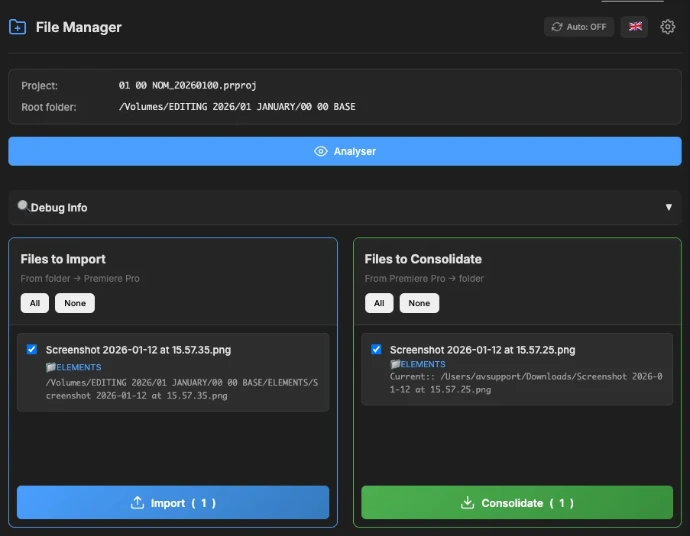
Main Features
Smart import of new files from the project folder.
Camera folder support for common card structures.
Consolidation of external files into the project structure.
Auto-import toggle with visual feedback.
SpellBook support for shortcuts and control surfaces.
Auto-relink when media files are moved.
File and folder exclusion filters.
Multi-language interface.
Responsive UI with compact mode.
Full instruction, readme and changelogs
Disclaimer: AI was used a lot to create this. I can't guarantee that it will work immediately.
For more info, support and question, join my Discord !
- v1.4.0 (Latest) - 2026-07-06- Added SpellBook compact commands for external shortcuts and control surfaces. Added a clickable version badge in the full-mode header that opens the File Manager product page.- Improved camera-card imports, Windows NAS path handling, and installer debug-mode coverage.
- v1.3.0- Added camera folder structure handling for import: ARRIRAW, RED, AVCHD, Canon XF, Panasonic P2, XDCAM-EX, XDCAM-HD, Sony HDV, Sony a7S, and DCIM.- Camera imports now keep only the useful media clip and avoid recreating full technical card subfolders in bins.- Added UI language support for Deutsch, English, Español, Français, Italiano, Português (Brasil), Русский, 日本語, and 简体中文.- Improved import filtering, scan performance, import batching, debug logging, and auto-import persistence.- Fixed Windows NAS path normalization for consolidation.
- v1.1.0- Added NAS performance improvements, detailed consolidation progress, and compact-mode UX updates. Moved configuration files to local storage and improved settings reliability.
- v1.0.4- Improved duplicate detection, moved-project handling, debug visibility, and external file path comparison.
- v1.0.3- Improved import duplicate detection for moved projects.
- v1.0.2- Added debug UI and improved troubleshooting diagnostics.

If you have question or issue, you can also send mail a mail below.